
Meow Apps AI Engine PRO WordPress 3.1.9
- Version: 3.1.9
- Update: 18 October 2026
- License: GPL
- Version: 3.1.9
- Last Update: 18 October 2026
- License: GPL
Save up to 80% off
* Only 3 licensed products included with the offer
$99.00 Original price was: $99.00.$2.99Current price is: $2.99.
-
 Fast & Regular Updates
-
Unlimited Domain Usage
-
100% Tested & Virus- free
-
Original Product with the lowest price ever
-
Downloaded from the Original Authors
-
Instant Download at fast download speed
-
Get this product for Free with Membership.
-
24/7 Chat Support

- Version: 3.1.9
- Last updated: October 18, 2026
- Type: WordPress GPL Plugins
- Licence: GNU GPL v2 or later
- Developer: Developer website ↗
- Not affiliated with the developer
Can't Decide A Single Theme/Plugin?Join The Club Now
Grab the Summer Festive Sale offer. Use Coupon Code: GPLD10
Original License Products
Meow Apps AI Engine PRO WordPress GPL
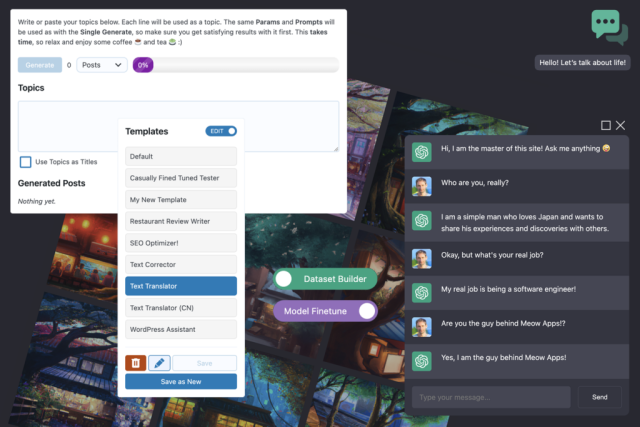
AI Engine Pro by Meow Apps connects WordPress to AI models from OpenAI, Anthropic, Google and others. Use it for chatbots, content generation, AI forms and embeddings trained on your own content. This AI Engine Pro GPL download includes the original plugin files.
Key features
- Chatbots: customisable AI chat on any page.
- Content tools: generate and rewrite posts, titles and excerpts.
- AI forms: build AI-powered tools for visitors.
- Embeddings: answer questions from your own content.
- Multiple providers: OpenAI, Anthropic, Google and more.
- Usage limits: control spending per user or role.
What’s included
- The original, unmodified plugin ZIP as released by the developer
- Instant download from My Account → Downloads
- One year of updates: download each new version from your account and install it
- Use on unlimited sites, including client projects, as the GPL allows
Not included: the developer’s licence key, their support desk, automatic one-click updates and any features that run on the developer’s own servers. You pay your AI provider directly for usage. GPL Download is not affiliated with the developer.
Requirements
- WordPress 5.8 or newer and PHP 7.4 or newer
- Your own API key from an AI provider
How to install
- Download the plugin ZIP from My Account → Downloads.
- In WordPress, go to Plugins → Add New → Upload Plugin, choose the ZIP and click Install Now.
- Click Activate. If the plugin asks for a licence key, dismiss the notice; the plugin works without it. Add your AI provider’s API key in the plugin settings.
- To update later, upload the new version the same way and choose Replace current with uploaded.
FAQ
Do I need an API key?
Yes. AI Engine uses your own key from OpenAI, Anthropic, Google or another supported provider.
Can I train a chatbot on my site content?
Yes. Embeddings let the chatbot answer from your content.
Does AI Engine include AI credits?
No. You pay your AI provider for usage.
Browse more GPL plugins, or get every item with a GPL Download membership.
Download Meow Apps AI Engine PRO WordPress
Members can download this product for free or by using credits.
Important Notice: Please raise a support ticket if you don’t find the download link here.
Meow Apps AI Engine PRO WordPress FAQs
Buy it on its own, or join a GPL Download membership to download every product on the site. After checkout, your files are in My Account → Downloads.
Download the ZIP from My Account → Downloads. In WordPress, go to Plugins → Add New → Upload Plugin (or Appearance → Themes → Add New → Upload Theme for themes), choose the ZIP and click Install Now, then Activate.
Yes. The GPL lets you use AI Engine Pro on as many personal and client sites as you like. The developer’s licence key, support and cloud services aren’t included.
The current version on GPL Download is v3.1.9. For the full list of changes, see the developer’s changelog.
It’s released under the GNU General Public License, which allows redistribution. You get the same files without the developer’s licence key or support, which is why the price is lower.
Single purchases include one year of updates. Members get updates for as long as their plan is active. When a new version is out, download it from My Account → Downloads and upload it with Replace current with uploaded. If our version is behind, click Request Update on the product page or contact us.
We help with downloading, installing and setting up AI Engine Pro. We aren’t the developer, so we can’t change features or fix bugs in the developer’s code.
Reviews
You must be logged in to post a review.
Reviews
Clear filtersThere are no reviews yet.