
Availability Scheduler 12.6
- Version: 12.6
- Update: 18 October 2026
- License: GPL
- Version: 12.6
- Last Update: 18 October 2026
- License: GPL
Save up to 80% off
* Only 3 licensed products included with the offer
$19.00 Original price was: $19.00.$2.99Current price is: $2.99.
-
 Fast & Regular Updates
 -
Unlimited Domain Usage
-
100% Tested & Virus- free
-
Original Product with the lowest price ever
-
Downloaded from the Original Authors
-
Instant Download at fast download speed
-
Get this product for Free with Membership.
-
24/7 Chat Support

- Version: 12.6
- Last updated: October 18, 2026
- Type: WordPress GPL Plugins
- Licence: GNU GPL v2 or later
- Developer: Developer website ↗
- Not affiliated with the developer
Can't Decide A Single Theme/Plugin?Join The Club Now
Grab the Summer Festive Sale offer. Use Coupon Code: GPLD10
Original License Products
Availability Scheduler GPL
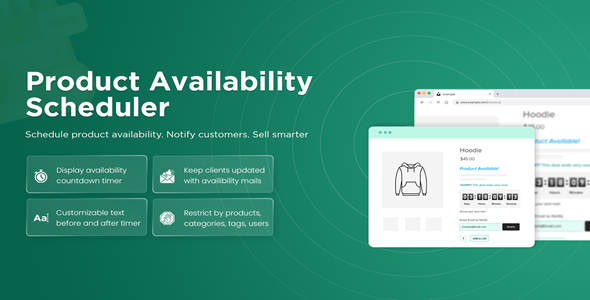
Automate Product Purchasing Windows with Availability Scheduler for WooCommerce
The Availability Scheduler extension for WooCommerce is a powerful e-commerce automation plugin engineered to schedule precise purchasing windows, manage product availability timelines, and deploy urgency-driving countdown timers across your online store. For modern e-commerce retailers, restaurants, bakeries, artisan creators, and limited-edition product drop brands, managing when items can be purchased is vital to maintaining operational sanity and driving customer demand. Distributed under the 100% legal GPL license, this premium scheduling utility gives store managers, marketing agencies, and web developers enterprise time-based catalog controls without ongoing vendor licensing fees. When you choose to download Availability Scheduler from GPL Download, you obtain genuine, untouched source code optimized to orchestrate timely sales campaigns and streamline inventory order fulfillment.
Operating an online store often requires restricting sales to specific business hours, seasonal holiday intervals, or scheduled preorder release dates. Rather than manually publishing and unpublishing products at odd hours of the night, the Availability Scheduler plugin automates your entire sales schedule. By establishing global, category-level, or per-product rules, store administrators can automatically disable cart buttons, display countdown timers to upcoming releases, and inform shoppers exactly when ordering will reopen. This level of automated precision protects kitchen staff from after-hours orders, assists wholesale manufacturers in managing production capacity, and builds immense psychological anticipation for exclusive merchandise drops.
Architectural Overview: Time-Based Catalog Automation Engine
The technical architecture of this scheduling extension provides robust, server-efficient time zone synchronization and seamless WooCommerce integration.
Multi-Tiered Rule Scheduling Hierarchy
Flexibility is paramount when managing complex e-commerce catalogs. The catalog management framework operates on an intelligent inheritance system that applies scheduling parameters at three distinct operational levels:
- Global Storewide Rules: Establish general business operating hours across your entire catalog, ideal for local delivery services that only accept orders during standard business opening times.
- Product Category Rules: Assign dedicated schedules to specific product lines, such as enabling weekend brunch menus or seasonal holiday gift baskets.
- Individual Product Rules: Override higher-level settings for bespoke items, limited-run collaboration apparel, or flash sale promotional items requiring minute-by-minute purchasing windows.
Intelligent Server Time Zone Synchronization
E-commerce operations frequently span regional and international boundaries. The extension synchronizes flawlessly with your WordPress localized time zone settings, ensuring that countdown clocks and order cutoff deadlines trigger with exact accuracy regardless of the customer’s physical geolocation.
Dynamic Frontend Notification & Timer System
When items enter or exit an active availability window, the extension updates the frontend interface dynamically. Store owners can display interactive countdown timers, informative availability badges, and customized customer notices without requiring manual page cache purges or server restarts.
Comprehensive Feature Breakdown: Availability Scheduler
This time-based automation suite delivers an expansive collection of catalog management, countdown, and scheduling tools designed for serious WooCommerce merchants.
Flexible Recurring & Fixed Time Schedules
Configure recurring operational hours or one-time promotional windows with granular administrative controls.
Daily & Weekly Recurring Operating Hours
Define weekly schedules with multiple opening and closing intervals per day (e.g., Monday through Friday lunch orders from 11:00 AM to 2:00 PM and dinner orders from 5:00 PM to 10:00 PM).
Specific Calendar Date Ranges
Schedule future sales campaigns that automatically activate on a specific calendar date and hour, then seamlessly expire after a predetermined promotional period.
Recurring Monthly or Seasonal Cycles
Automate recurring annual or monthly purchasing periods for subscription clubs, seasonal agricultural harvests, or quarterly merchandise preorders.
Interactive Urgency Timers & Availability Notices
Transform idle browsing traffic into immediate buyers through visual scheduling indicators.
Dynamic Live Countdown Clocks
Display real-time countdown timers on single product pages and catalog grid cards indicating exactly how much time remains before an item opens for ordering or closes for the season.
Customizable Status Badges
Highlight product availability states with informative badges such as “Coming Soon,” “Preorders Open,” “Ordering Closed,” or “Weekend Special Only.”
Contextual Call-to-Action Messaging
Replace disabled “Add to Cart” buttons with personalized explanatory notices that inform customers of future availability dates and encourage them to join email notification waitlists.
Granular Checkout & User Role Overrides
Maintain total operational flexibility across diverse customer groups and administrative workflows.
Catalog Browsing Visibility Controls
Choose whether closed products remain visible in your catalog for discovery or are completely hidden from store archives until their active ordering window arrives.
User Role Whitelisting
Permit store administrators, customer service representatives, or VIP B2B wholesale buyers to bypass scheduling restrictions and place orders at any time.
Cart Protection & Expiration Guards
Prevent customers from lingering with scheduled items in their shopping carts by automatically verifying availability timestamps before final payment processing.
Comparison Matrix: Availability Scheduler vs. Manual Management vs. Basic Plugins
Review how the Availability Scheduler plugin provides enterprise-grade control compared to manual catalog updates and generic plugins.
| Operational Metric | Availability Scheduler | Manual Product Drafting | Basic Store Notice Plugins |
|---|---|---|---|
| Automated Scheduling | Full Daily, Weekly, & Date Range Scheduling | Requires Manual Publishing/Drafting | Manual Banner Toggling Only |
| Live Countdown Timers | Built-in Dynamic Real-Time Clocks | No Dynamic Countdown Support | Requires Third-Party Add-on |
| Rule Hierarchy | Global, Category, & Single Product Levels | Manual Single Product Only | Global Site Notice Only |
| User Role Overrides | Whitelist Admins, Wholesalers, & VIPs | Not Available | Not Available |
| Operational Overhead | Zero Overhead Once Configured | Extremely High Staff Overhead | High Daily Maintenance |
| GPL Software Freedom | 100% Free under GNU GPL License | Default WooCommerce | Annual Subscription Required |
Real-World Deployment Scenarios & Commercial Use Cases
The time-based automation provided by the Availability Scheduler plugin offers measurable efficiency gains across diverse commercial sectors.
Restaurants, Bakeries & On-Demand Food Delivery
Food service businesses must limit orders to active kitchen preparation hours. The scheduling engine ensures breakfast menus automatically switch to lunch offerings and orders cut off cleanly at kitchen closing time.
Exclusive Streetwear & Limited Artisan Drops
Fashion brands organizing high-heat apparel drops can schedule product pages in advance with countdown timers, generating tremendous social media anticipation before cart buttons unlock at the exact launch second.
Seasonal Florists & Farm-to-Table Subscriptions
Flower shops and agricultural cooperatives managing limited seasonal blooms or harvest shares can establish strict ordering cutoff windows to coordinate harvesting and delivery schedules.
Web Agencies Delivering Client E-Commerce Projects
Digital agencies constructing custom storefronts for clients deploy this scheduling suite under the flexible GPL license across multiple staging, test, and production stores without paying recurring licensing fees.
Step-by-Step Installation & Setup Guide
Configuring the Availability Scheduler on your WooCommerce store takes only minutes and requires no programming knowledge.
1. Plugin Installation and Activation
- Acquire your clean extension package via instant download Availability Scheduler from GPL Download.
- Log in to your WordPress administration panel, navigate to Plugins > Add New > Upload Plugin, select the downloaded ZIP file, and click Install Now.
- After the upload finishes successfully, select Activate Plugin.
2. Configuring Global Store Schedules
- Navigate to WooCommerce > Settings > Availability Scheduler.
- Set your default operating schedule by selecting recurring days of the week and daily opening and closing hours.
- Configure your storewide message for when ordering is closed (e.g., “Our online kitchen is closed for the evening. Ordering reopens tomorrow at 8:00 AM.”).
3. Setting Product-Level Schedules & Countdown Timers
- Open any WooCommerce product in the WordPress editor and scroll down to the Product Data panel.
- Click on the Availability Scheduler tab to override global rules with custom date ranges or unique daily time windows.
- Enable the Countdown Timer toggle and save your changes to display an interactive clock on the single product page.
Building a High-Performance Storefront with Complementary Tools
A thriving WooCommerce store functions best when supported by reliable address validation, payment, and caching extensions from the GPL catalog:
- Validate customer delivery addresses and eliminate returned parcels with Postcode Address Validation.
- Manage recurring subscription billing cycles and scheduled deliveries using Flexible Subscriptions Recurring Shipping.
- Organize complex product specifications, nutritional tabs, and size charts with WooCommerce Tab Manager.
- Process international credit card payments securely with WooCommerce Global Payments.
- Expand checkout options using Intuit Payments Gateway.
- Accelerate catalog page speed and Core Web Vitals performance using W3 Total Cache Pro.
- Browse our complete directory of conversion-focused WordPress plugins.
- Read our comprehensive review of the best GPL WordPress themes for freelancers and small businesses.
- Unlock unlimited downloads across our extensive open-source library with an all-inclusive GPL Download Membership plan.
100% GPL Licensing Freedom & Safety Assurance
Every digital product available on GPL Download is distributed strictly under the provisions of the GNU General Public License (GPLv3). When you download from our platform, you invest in open-source software freedom and transparent development practices.
Clean, Untouched Code Guarantee
We provide 100% genuine, original software archives. Every file distributed through GPL Download is identical to the developer’s authentic release, completely free from malicious scripts, unauthorized advertising, or tracking backdoors.
Deploy Across Unlimited Client Domains
Unlike restrictive proprietary vendor licenses that enforce costly annual renewal fees per domain, the GPL license grants you the full legal freedom to install and deploy Availability Scheduler across unlimited commercial websites, client staging environments, and production stores without purchasing additional licenses.
Independence from Upstream SaaS Subscriptions
You enjoy complete operational autonomy over your plugin files. The plugin codebase functions completely upon installation without requiring recurring vendor domain verification keys. For technical documentation and setup guides, web developers can consult official Availability Scheduler Documentation.
Frequently Asked Questions (FAQ): Availability Scheduler
Explore answers to common questions regarding technical features, setup requirements, and licensing for the Availability Scheduler extension.
General & Operational Questions
Can I schedule products to be available only on specific days of the week?
Yes. You can configure recurring schedules that restrict product purchasing to specific days, such as Friday through Sunday, or during specific daily hours.
What happens when a customer visits a product page outside of its available window?
The “Add to Cart” button is automatically disabled or hidden, and a customizable notice informs the customer when the item will be available for purchase. Optionally, a dynamic countdown timer can display the exact remaining time.
Can I allow administrators or wholesale customers to order closed products?
Yes. The extension includes a user role whitelisting feature, allowing administrators, shop managers, or wholesale user roles to purchase products regardless of active scheduling restrictions.
Does Availability Scheduler work with variable WooCommerce products?
Yes. The plugin supports both simple and variable WooCommerce products, enabling you to manage availability across entire product lines or specific variations.
Licensing & GPL Questions
Is it legal to use this GPL-licensed plugin on commercial client stores?
Yes, completely legal. The GNU General Public License explicitly allows you to install, modify, and deploy this software across as many commercial client stores and websites as you require without paying vendor licensing surcharges.
Do I need a WooCommerce.com license key to use Availability Scheduler?
No license key is required for the plugin to function fully on your website. Marketplace license keys are only utilized for automatic upstream dashboard update notifications and direct vendor support tickets.
How do I update Availability Scheduler when new versions are released?
Whenever an update is published, simply download the latest package from GPL Download and update your WordPress plugin via your admin dashboard or FTP without losing any configured schedule settings.
Download Availability Scheduler
Members can download this product for free or by using credits.
Important Notice: Please raise a support ticket if you don’t find the download link here.
Availability Scheduler FAQs
Buy it on its own, or join a GPL Download membership to download every product on the site. After checkout, your files are in My Account → Downloads.
Download the ZIP from My Account → Downloads. In WordPress, go to Plugins → Add New → Upload Plugin (or Appearance → Themes → Add New → Upload Theme for themes), choose the ZIP and click Install Now, then Activate.
Yes. The GPL lets you use Availability Scheduler on as many personal and client sites as you like. The developer’s licence key, support and cloud services aren’t included.
The current version on GPL Download is v12.6. For the full list of changes, see the developer’s changelog.
It’s released under the GNU General Public License, which allows redistribution. You get the same files without the developer’s licence key or support, which is why the price is lower.
Single purchases include one year of updates. Members get updates for as long as their plan is active. When a new version is out, download it from My Account → Downloads and upload it with Replace current with uploaded. If our version is behind, click Request Update on the product page or contact us.
We help with downloading, installing and setting up Availability Scheduler. We aren’t the developer, so we can’t change features or fix bugs in the developer’s code.
Reviews
You must be logged in to post a review.
Reviews
Clear filtersThere are no reviews yet.