
Trueman Resume WordPress Theme 1.5.0
- Version: 1.5.0
- Update: 25 November 2026
- License: GPL
- Version: 1.5.0
- Last Update: 25 November 2026
- License: GPL
$19.00 Original price was: $19.00.$2.99Current price is: $2.99.
-
 Fast & Regular Updates
-
Unlimited Domain Usage
-
100% Tested & Virus- free
-
Original Product with the lowest price ever
-
Downloaded from the Original Authors
-
Instant Download at fast download speed
-
Get this product for Free with Membership.
-
24/7 Chat Support

- Version: 1.5.0
- Last updated: November 25, 2026
- Type: WordPress GPL Themes
- Licence: GNU GPL v2 or later
- Developer: Developer website ↗
- Not affiliated with the developer
Can't Decide A Single Theme/Plugin?Join The Club Now
Grab the Summer Festive Sale offer. Use Coupon Code: GPLD10
Original License Products
Trueman Resume WordPress Theme GPL
Trueman Resume WordPress Theme GPL: personal CV and portfolio layouts
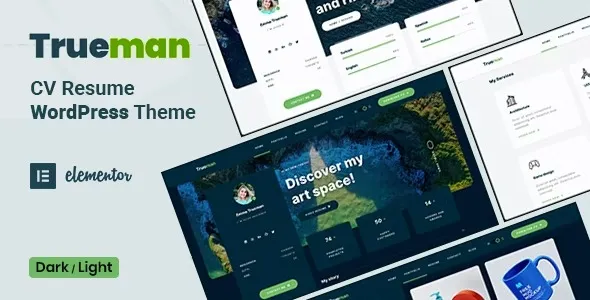
Trueman Resume WordPress Theme (Trueman) is a personal CV, resume and portfolio WordPress theme developed by bslthemes. It is built for developers, designers, freelancers, consultants and creative professionals who want a clean, structured online resume with dark and light styling, project showcases and contact forms. The package includes the parent theme, child theme, bundled plugins archive and documentation.
You can download Trueman Resume WordPress Theme v1.5.0 from GPL Download for $2.99, or get it free with a membership. You receive the original package under the GNU General Public License. GPL Download is not affiliated with bslthemes.
What is inside the download
- Parent theme (
Theme/trueman.zip). The main Trueman v1.5.0 WordPress theme by bslthemes with CV, resume, timeline and portfolio templates. - Child theme (
Theme/trueman-child.zip). Ready-to-install child theme for safe CSS and template customisations. - Bundled plugins (
Plugins/trueman-plugins.zip). Companion plugin package included inside thePlugins/folder. - Documentation and licensing. Includes
Documentation.txt,Readme.txtand theLicensing/directory.
Requirements for v1.5.0
- WordPress 6.0 or higher (tested up to 7.0 per
style.css) - PHP 7.4 or higher (declared in
style.css) - Licence: GNU General Public License (
style.css) with ThemeForest split licensing notes inLicensing/
The ZIP (and inner Theme/trueman.zip) was checked before upload: it is a valid archive with no obfuscated code patterns (eval(base64 or gzinflate(base64) and no binary executables.
How to install Trueman Resume WordPress Theme
- Download
elements-trueman-personal-portfolio-wordpress-theme-1.5.0.zipfrom the Download section of this page after purchase, or through your membership. - Unzip the downloaded package first on your computer. Do not upload the outer archive directly to WordPress.
- Open the
Theme/folder, go to Appearance > Themes > Add New > Upload Theme, uploadtrueman.zipand click Install Now and Activate. - Optionally upload and activate
Theme/trueman-child.zipif you plan to add custom CSS or PHP overrides. - Install the plugins prompted by the theme (including any companion plugin from
Plugins/trueman-plugins.zipvia Plugins > Add New > Upload Plugin). - Replace demo resume entries, skills and portfolio items with your own work history and publish.
Tips for an effective personal CV and portfolio site
Keep your homepage focused on three essentials: a clear one-line role summary above the fold, three to six curated portfolio case studies with real outcomes, and a working contact form tested with SMTP so recruiter or client enquiries never land in spam. Use the child theme if you plan to customise layout templates so future theme updates stay safe.
Always keep a recent backup of your WordPress files and database before installing themes or plugins, and purge your caching plugin after saving theme options.
For agencies and developers managing multiple WordPress installations, keeping a verified local copy of the exact release archive makes staging tests and rollbacks straightforward.
Before deploying any new theme or plugin update to a production site, test the installation on a staging copy first, verify that your PHP version and active plugins are compatible, and confirm that forms, navigation menus and mobile layouts behave as expected.
Keeping a clean staging workflow also makes it straightforward to compare plugin or theme behaviour across WordPress updates without risking downtime for live visitors or customers.
In addition, check your XML sitemap and robots settings after publishing new pages so search engines index your primary content cleanly without picking up leftover demo posts, unused tag archives or placeholder media attachments.
Is it legal to use Trueman under the GPL?
Trueman declares the General Public License in its style.css header, while ThemeForest/Envato packages apply a split licence to bundled design assets as noted in Licensing/. GPL Download supplies the original package without modification and is not affiliated with bslthemes. For official vendor support and automatic updates, purchase a licence from bslthemes.
Trueman Resume WordPress Theme FAQ
Why can’t I upload the downloaded ZIP directly in Appearance > Themes?
The downloaded file is an outer package containing Theme/trueman.zip, Theme/trueman-child.zip, Plugins/, Documentation.txt and Licensing/. Unzip it first and upload Theme/trueman.zip.
Is a child theme included?
Yes. Theme/trueman-child.zip is included inside the Theme/ folder.
What WordPress and PHP versions are supported?
The theme’s style.css header lists WordPress 6.0 or higher (tested up to 7.0) and PHP 7.4 or higher.
Do I need a licence key to use Trueman?
No licence-key or purchase-code gate blocked our scan, and the theme declares GPL in style.css.
How do I update safely when a new version is released?
Back up your WordPress database and files, upload the new ZIP on a staging copy first, verify key pages and forms, and then apply the update on your live site before purging your cache.
Once your staging checks pass, deploy the exact same verified archive to production and purge all page and object caches.
Download Trueman Resume WordPress Theme
Important Notice: Please raise a support ticket if you don’t find the download link here.
Trueman Resume WordPress Theme FAQs
Buy it on its own, or join a GPL Download membership to download every product on the site. After checkout, your files are in My Account → Downloads.
Download the ZIP from My Account → Downloads. In WordPress, go to Plugins → Add New → Upload Plugin (or Appearance → Themes → Add New → Upload Theme for themes), choose the ZIP and click Install Now, then Activate.
Yes. The GPL lets you use Trueman Theme on as many personal and client sites as you like. The developer’s licence key, support and cloud services aren’t included.
The current version on GPL Download is v1.5.0. For the full list of changes, see the developer’s changelog.
It’s released under the GNU General Public License, which allows redistribution. You get the same files without the developer’s licence key or support, which is why the price is lower.
Single purchases include one year of updates. Members get updates for as long as their plan is active. When a new version is out, download it from My Account → Downloads and upload it with Replace current with uploaded. If our version is behind, click Request Update on the product page or contact us.
We help with downloading, installing and setting up Trueman Theme. We aren’t the developer, so we can’t change features or fix bugs in the developer’s code.
Reviews
You must be logged in to post a review.
Reviews
Clear filtersThere are no reviews yet.