
Tabs Pro for Woocommerce: Extra Tabs for Product Page 4.2
- Version: 4.2
- Update: 15 October 2026
- License: GPL
- Version: 4.2
- Last Update: 15 October 2026
- License: GPL
Save up to 80% off
* Only 3 licensed products included with the offer
$19.00 Original price was: $19.00.$2.99Current price is: $2.99.
-
 Fast & Regular Updates
-
Unlimited Domain Usage
-
100% Tested & Virus- free
-
Original Product with the lowest price ever
-
Downloaded from the Original Authors
-
Instant Download at fast download speed
-
Get this product for Free with Membership.
-
24/7 Chat Support

- Version: 4.2
- Last updated: October 15, 2026
- Type: WordPress GPL Plugins
- Licence: GNU GPL v2 or later
- Developer: Developer website ↗
- Not affiliated with the developer
Can't Decide A Single Theme/Plugin?Join The Club Now
Grab the Summer Festive Sale offer. Use Coupon Code: GPLD10
Original License Products
Tabs Pro for Woocommerce: Extra Tabs for Product Page GPL
Tabs Pro for Woocommerce: Extra Tabs for Product Page GPL: Custom Product Tabs, Accordion Layouts, and Information Architecture
Modern e-commerce storefronts, technical equipment retailers, fashion boutiques, supplement brands, industrial hardware suppliers, and digital merchandise agencies require an organized, modular format to present in-depth product information, sizing guides, technical specifications, warranty terms, and downloadable manuals without cluttering single product pages. The Tabs Pro for Woocommerce: Extra Tabs for Product Page delivers a versatile, drag-and-drop tab management and product information structuring suite engineered specifically for WooCommerce. Distributed under the Tabs Pro for Woocommerce: Extra Tabs for Product Page GPL, this premier merchandising tool empowers store owners to deploy unlimited custom tabs, reorder default sections, embed interactive shortcodes, and create responsive accordion layouts without paying recurring developer licensing fees.
Merchandising directors, e-commerce webmasters, and digital agency developers can acquire the Tabs Pro for Woocommerce: Extra Tabs for Product Page GPL Download to unlock global and product-specific tab assignments, category-level inheritance rules, WYSIWYG rich text tab builders, and seamless mobile accordion folding across unlimited client domains. By exploring our complete WordPress plugins catalog and reviewing essential optimization practices in our guide on how to speed up WordPress GPL plugins, documentation managers can maintain rapid page execution, enrich internal contextual linking, and deliver seamless product navigation across all desktop and mobile devices.
What Is Tabs Pro for Woocommerce: Extra Tabs for Product Page?
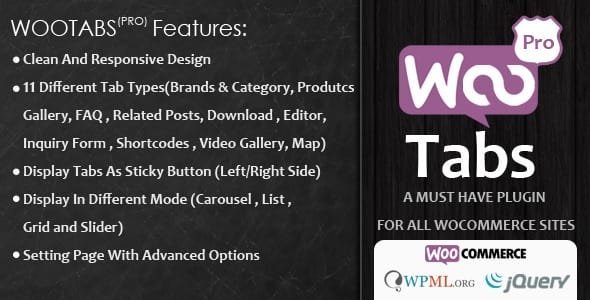
The Tabs Pro for Woocommerce: Extra Tabs for Product Page is a dedicated WooCommerce product page extension designed to create, customize, and organize unlimited information tabs on single product pages.
Engineered strictly in accordance with modern WordPress and WooCommerce coding conventions and supported by thorough developer documentation, this plugin overcomes the rigid limitations of standard WooCommerce templates. Standard installations restrict merchants to three basic tabs: Description, Additional Information, and Reviews. This utility allows site builders to introduce unlimited custom tabs containing rich formatting, downloadable PDFs, embedded video walk-throughs, FAQ accordions, and custom contact forms. Merchandisers can apply tabs globally across entire product lines or assign bespoke technical documentation to individual items.
Key Features of Tabs Pro for Woocommerce: Extra Tabs for Product Page
The technical architecture of the Tabs Pro for Woocommerce: Extra Tabs for Product Page combines global tab inheritance, WYSIWYG content editing, and responsive mobile presentation options.
Flexible Global, Category, and Specific Tab Rules
Assign informative content efficiently across your entire WooCommerce product catalog.
Global Catalog Tabs for Universal Policies
Create universal tabs (such as Shipping & Returns, Brand Story, or Warranty Information) that appear automatically across all products with a single configuration.
Category and Tag-Based Tab Targeting
Apply specific tab sets to designated product categories (such as Sizing Charts for apparel or Ingredients for cosmetics) without manual product editing.
Individual Product Tab Customization
Add unique, product-specific tabs directly on the WooCommerce product edit screen to detail unique technical schematics or certifications.
Rich Media Content and Shortcode Compatibility
Enrich product tabs with engaging multimedia, forms, and interactive blocks.
Full WYSIWYG Rich Text and HTML Support
Format tab contents with rich typography, bullet points, responsive comparison tables, images, and embedded video players effortlessly.
Seamless Third-Party Shortcode Integration
Embed contact forms, FAQ accordions, custom calculators, photo galleries, or booking calendars directly inside tabs using standard WordPress shortcodes.
Downloadable PDF Attachments and Manuals
Provide direct links to downloadable user manuals, safety data sheets, and compliance certificates in dedicated documentation tabs.
Default Tab Reordering and Visual Layout Modes
Retain complete visual command over the product page layout and mobile behavior.
Reorder, Rename, or Hide Default Tabs
Easily rename standard WooCommerce tabs, change their display order, or disable the default Reviews and Description tabs when not needed.
Horizontal, Vertical, and Accordion Presentation Modes
Choose between classic horizontal tabs, modern vertical side tabs, or clean stacked accordions to match your site branding.
Fluid Mobile Accordion Folding
Automatically transforms wide desktop tab bars into touch-friendly collapsible accordions on mobile devices, ensuring effortless smartphone reading.
Built with optimized DOM rendering and transient database caching, the plugin ensures that product tab lookups execute in microseconds. This keeps server response times fast even on encyclopedic websites containing thousands of detailed product pages.
Who Should Use This Product Tabs Suite?
The Tabs Pro for Woocommerce: Extra Tabs for Product Page delivers outstanding content clarity and customer decision confidence across diverse online retail categories.
Target Web Reference Applications
Fashion, Apparel, and Footwear Brands
Provide accurate measurement guides, international size conversion tables, and fabric care instructions in dedicated sizing tabs.
Cosmetics, Wellness, and Nutritional Supplements
Detail organic certifications, active ingredients, clinical research citations, and dosage recommendations cleanly.
Consumer Electronics and Technical Equipment
Organize complex hardware specifications, firmware update guides, warranty policies, and compatibility matrices into structured tabs.
Industrial Supplies and Machinery Wholesalers
Publish engineering schematics, PDF spec sheets, and installation instructions for commercial contractors and trade buyers.
What Is Tabs Pro for Woocommerce: Extra Tabs for Product Page GPL?
The Tabs Pro for Woocommerce: Extra Tabs for Product Page GPL represents the open-source distribution of this product tabs suite under the provisions of the GNU General Public License v3.0.
Under Freedom 2 of the GPL charter, site owners, developers, and agency teams retain the unhindered legal right to run, modify, study, and distribute this software across unlimited websites. Because WordPress plugins operate directly within the WordPress software ecosystem, their derivative code falls under the open-source GPL framework. Choosing this verified distribution framework grants digital merchants total financial autonomy, eliminating recurring per-domain licensing charges and allowing organizations to build organized product pages freely.
Tabs Pro for Woocommerce: Extra Tabs for Product Page GPL Download: What You Get
Acquiring this verified plugin archive from GPL Download provides an authentic, production-ready package ready for immediate site deployment.
Every download contains untouched plugin files matching the latest stable release from the original developers. Our security scanning infrastructure evaluates every archive to verify zero malicious code, advertising backdoors, or unauthorized modifications. You receive full multi-site deployment rights across personal projects, staging environments, and client websites. For development agencies managing numerous e-commerce portals, our All-Access Membership Pass grants unrestricted daily downloads across our entire library of verified themes and extensions.
How to Install Tabs Pro for Woocommerce: Extra Tabs for Product Page
Setting up the Tabs Pro for Woocommerce: Extra Tabs for Product Page on your active WordPress platform requires only a few clear steps.
- Verify Core Requirements: Ensure your server operates WordPress 5.8 or higher, WooCommerce 6.0 or higher, and standard database support.
- Download Verified Plugin: Obtain the authenticated extension archive from the verified Tabs Pro for Woocommerce: Extra Tabs for Product Page GPL Download repository page.
- Upload to WordPress: In your WordPress dashboard, navigate to Plugins > Add New > Upload Plugin, choose the downloaded zip file, and click Install Now.
- Activate Plugin: Click Activate Plugin to register the extra tabs suite inside your WordPress administration dashboard.
- Create Global Tabs: Open WooCommerce > Product Tabs to create universal tabs like Shipping, Returns, or Sizing Charts.
- Assign Category Rules: Designate specific category or tag filters if you want tabs to appear only on certain types of products.
- Publish and Test Product: View any single product page to verify tab placement, test mobile accordion responsiveness, and ensure smooth content rendering.
Technical Specifications and Catalog Synergies
The Tabs Pro for Woocommerce: Extra Tabs for Product Page is built with clean, modular PHP routines, modern CSS3 animations, and asynchronous AJAX handlers for maximum execution speed.
| System Metric | Minimum Baseline | Recommended Configuration |
|---|---|---|
| WordPress Version | WordPress 5.8+ | WordPress 6.4+ |
| WooCommerce Core | WooCommerce 6.0+ | Latest Stable WooCommerce Release |
| PHP Runtime | PHP 7.4 minimum | PHP 8.1 / 8.2 |
| Memory Limit | 128MB Memory | 256MB+ |
| Database Engine | MySQL 5.6+ / MariaDB 10.1+ | MySQL 8.0+ / MariaDB 10.6+ |
| Licensing Rights | GNU GPLv3 Open Source | Unlimited Domains & Staging |
Because detailed product pages display extensive content sections and media embeds, maintaining an optimized server environment ensures fluid tab switching without layout shifts. This plugin hooks cleanly into standard WooCommerce template filters without executing redundant queries, ensuring that product pages render smoothly across all devices.
Complement your creative web design and product merchandising stack by pairing this product tab suite with other premier tools across our catalog, such as variation data tables via Variations to Table Grid for Woocommerce, post-purchase funnels with Thank You Page Customizer for WooCommerce, and FAQ knowledge accordions using WP Clever FAQ Builder Plugin.
What Is Not Included
To preserve complete commercial transparency regarding our GPL catalog, please note the specific items excluded from this package:
- No Direct Author Help Desk Support: We do not provide one-on-one ticketing support from original developers. Comprehensive documentation and configuration tutorials are readily accessible online.
- No Proprietary Activation Keys: The plugin operates with 100% full visual functionality out of the box without requiring private vendor license keys or Envato purchase registration codes.
- No Custom Technical Copywriting: We supply pristine digital software files but do not write product descriptions, safety manuals, or technical specifications.
- No Commercial Font Licenses: Custom third-party font foundry files requiring commercial distribution licenses must be provided independently.
Frequently Asked Questions
Licensing and Commercial Usage
Is this GPL version of the plugin legal for commercial stores?
Yes. The Tabs Pro for Woocommerce: Extra Tabs for Product Page GPL is completely legal under the terms of the GNU General Public License. You are legally authorized to deploy and customize this plugin on commercial online stores, wholesale hubs, and client websites without paying recurring subscription fees.
Can I install this plugin on unlimited client domains?
Yes. Under the GPL framework, there are no artificial domain restrictions or per-site limits. You hold complete legal freedom to deploy the plugin across unlimited commercial, client, and personal staging websites.
Where can I download the authentic verified package?
You can acquire the verified, virus-scanned Tabs Pro for Woocommerce: Extra Tabs for Product Page GPL Download directly from our catalog at GPL Download as a single download or via our all-access membership pass.
Technical and Product Tabs Queries
Can I reorder or rename the default Description and Reviews tabs?
Yes. The plugin allows you to rename default WooCommerce tabs, adjust their display priority order, or hide them entirely if they are not relevant to your products.
Can I assign tabs to specific product categories rather than all products?
Yes. You can establish category-specific tabs that appear automatically on all products assigned to chosen categories, such as clothing or electronics.
Do tabs fold into accordions on mobile phones?
Yes. The responsive styling engine automatically transitions desktop tabs into clean collapsible accordions on mobile screens, providing a clean browsing experience.
Structure Product Information With Tabs Pro for Woocommerce: Extra Tabs for Product Page
Presenting detailed product specifications, size guides, and warranty documentation in clean, structured tabs eliminates customer purchase hesitation and elevates the shopping experience. The Tabs Pro for Woocommerce: Extra Tabs for Product Page equips store owners, agencies, and merchandisers with the global tab inheritance, shortcode embeds, and mobile accordion folding needed to build world-class product pages. Choose the verified Tabs Pro for Woocommerce: Extra Tabs for Product Page GPL today, or obtain the complete download archive from our catalog to launch customized product tabs across all your WordPress domains.
Download Tabs Pro for Woocommerce: Extra Tabs for Product Page
Members can download this product for free or by using credits.
Important Notice: Please raise a support ticket if you don’t find the download link here.
Tabs Pro for Woocommerce: Extra Tabs for Product Page FAQs
Buy it on its own, or join a GPL Download membership to download every product on the site. After checkout, your files are in My Account → Downloads.
Download the ZIP from My Account → Downloads. In WordPress, go to Plugins → Add New → Upload Plugin (or Appearance → Themes → Add New → Upload Theme for themes), choose the ZIP and click Install Now, then Activate.
Yes. The GPL lets you use Tabs Pro for WooCommerce on as many personal and client sites as you like. The developer’s licence key, support and cloud services aren’t included.
The current version on GPL Download is v4.2. For the full list of changes, see the developer’s changelog.
It’s released under the GNU General Public License, which allows redistribution. You get the same files without the developer’s licence key or support, which is why the price is lower.
Single purchases include one year of updates. Members get updates for as long as their plan is active. When a new version is out, download it from My Account → Downloads and upload it with Replace current with uploaded. If our version is behind, click Request Update on the product page or contact us.
We help with downloading, installing and setting up Tabs Pro for WooCommerce. We aren’t the developer, so we can’t change features or fix bugs in the developer’s code.
Reviews
You must be logged in to post a review.
Reviews
Clear filtersThere are no reviews yet.